
RCS vs SMS: differences in technology, reach and use


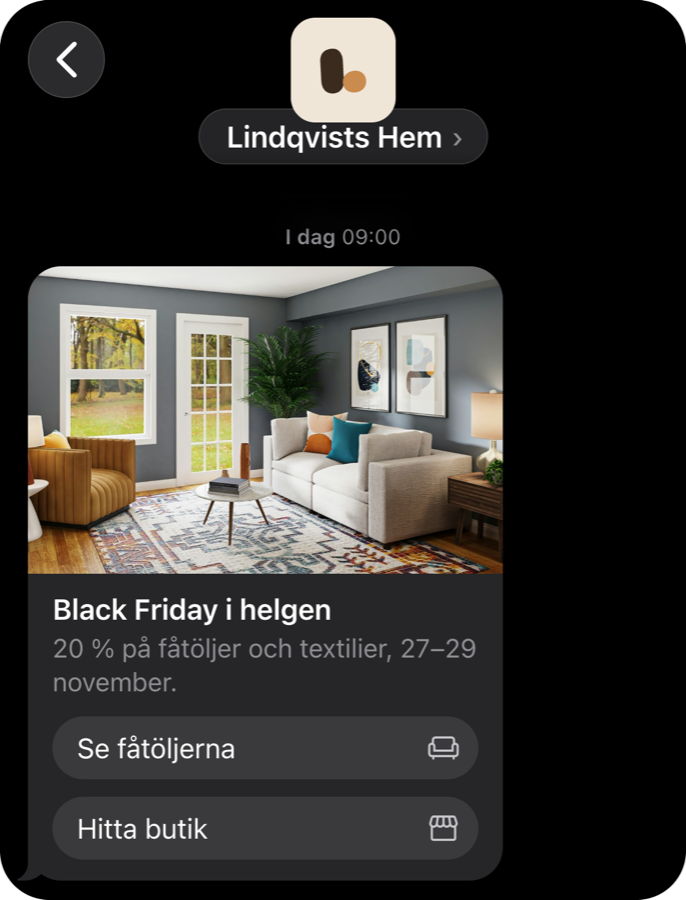
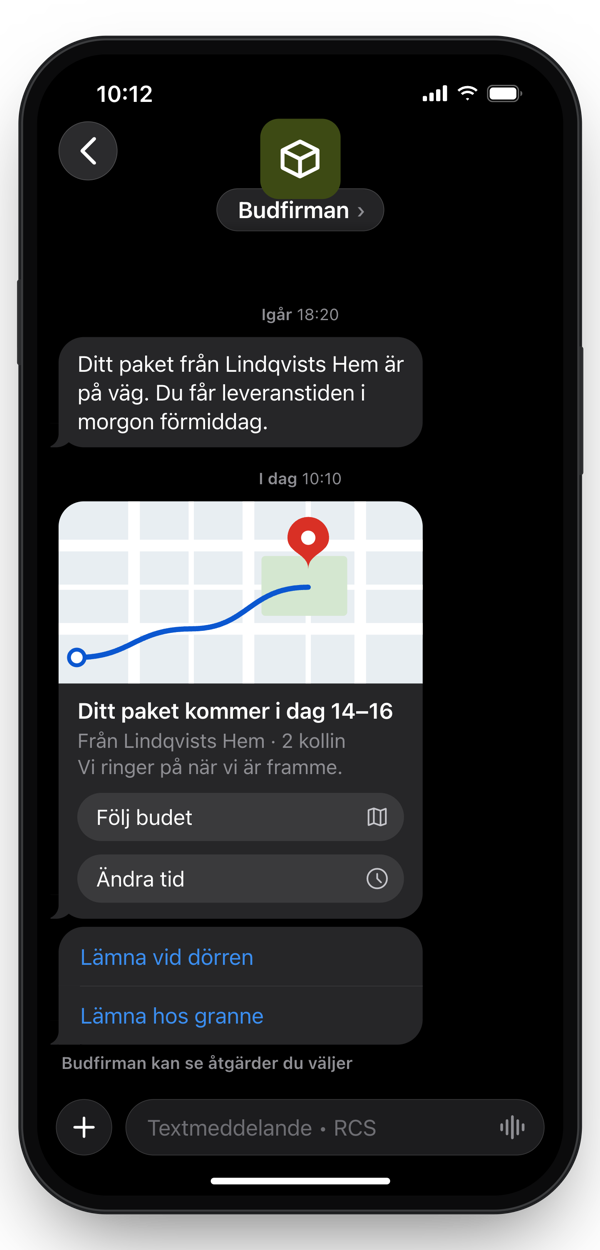
RCS introduces a verified sender, images and buttons in the phone's own messaging app. SMS reaches every mobile phone, but with text only. In Sweden, Android phones on all operators can receive RCS today, and iPhone support is being rolled out by all Swedish mobile operators. This article walks through how SMS and RCS differ in technology, reach and use.


Key points
- RCS introduces a verified sender, images, buttons and read receipts in the phone's built-in messaging app. The recipient does not need to install anything.
- SMS reaches every mobile phone, even without mobile data, but with text only: 160 characters per part. An RCS message holds up to 3,072 characters.
- RCS messages can be received by iPhone 11 and later with iOS 27, and by Android phones with Android 8.0 or later and Google Messages, on operators that have activated RCS.
- A capability check before every send picks the channel per recipient. If the recipient has no RCS, the message is sent as SMS, with the SMS text you set in the same request.
RCS and SMS side by side
What are the technical differences?
SMS was developed for the GSM network in the early 1990s. Sweden's first SMS was sent by Jonas Rexeke, founder of Spirius, in April 1993 from Europolitan's office in Karlskrona (SVT). The standard is maintained by 3GPP today (TS 23.040) and has barely changed since. To some extent, that is also its strength: SMS is sent over the mobile network's signalling channels, works on every mobile phone and arrives even without mobile data.
But SMS was built for another era. The sender is not checked, so a name in the sender field can be spoofed, and the message is not encrypted end to end. The content is text only, without images, buttons or read receipts. Nor is SMS built for conversations: every message is billed on its own, and you cannot reply to a sender shown by name.
RCS belongs to a new generation of messaging services. The GSMA, the mobile operators' industry association, is behind the standard, which lets operators and phones from different manufacturers work together. Google has driven the development: it bought the RCS provider Jibe in 2015 (TechCrunch), built RCS into Google Messages and runs the platform for business messaging.
For a long time RCS was still a niche technology, in practice limited to Android and Google Messages. The big milestone came in September 2024, when Apple added RCS support in iOS 18 (Apple). With Apple on board, RCS is now supported by most mobile phones, and that has led operators around the world to launch RCS in their networks. In Sweden, Tele2 and Comviq were first with RCS support on iPhone, in September 2026.
- Web app or systemsends the message
- Spirius SMS APIreceives and forwards
- Operator networksignalling, works without mobile data

- Web app or systemsends the message
- Spirius RCS APIreceives and forwards
- Google RCS for Businesschecks the verified sender
- Operator networkmobile data or Wi-Fi
Who can receive RCS in Sweden today?
The recipient needs a phone that supports RCS and an operator that has activated RCS. The recipient does not have to do anything: RCS is on by default, but can be turned off and on again in the settings.
- iPhone: iPhone 11 and later, and iPhone SE (2nd generation and later), with iOS 27 or later. Apple added RCS in iOS 18, but the Swedish operators require iOS 27. The setting is under Settings > Apps > Messages > RCS Messaging.
- Android: phones with Android 8.0 or later and Google Messages as the messaging app. New Samsung Galaxy phones ship with Google Messages. The setting is in Google Messages under Messages settings > RCS chats.
The status page lists which operators support RCS on Android and iPhone, with dates and sources.
What happens if the recipient has no RCS?
Then the message is sent as SMS, with the SMS text you set in the same request. Before every send, a capability check runs: does the number have RCS right now? The answer picks the channel, per recipient. If the number has RCS but the message is not delivered within the time you set, for example because the phone has no coverage, the RCS message is withdrawn and the SMS is sent instead.
In our API you set the SMS text separately from the RCS message. So you do not have to write one text that fits both: the RCS message can have an image and buttons, and the SMS its own wording with a link where RCS has a button. How to set SMS fallback in the request is in the RCS API developer documentation.
When is SMS still the right choice?
- Short notices with nothing to show. A reminder or an alert does not get clearer with an image. SMS arrives even without mobile data.
- Systems that should keep working as today. An existing SMS integration carries on unchanged. RCS needs a request to an RCS API and a verified sender.
- Recipients outside RCS. Phones and operators without RCS can only be reached by SMS. With SMS fallback you do not have to choose: the same send reaches both.
What does a business need to send RCS?
A verified sender: a brand and an agent approved by Google and the operators. Spirius helps you with the registration and with getting started with our RCS API. Read more on our RCS page.
Frequently asked questions
Sources
- Google: RCS for Business
- Google: RCS for Business billing FAQ
- Google: Boarding pass with Google Wallet
- 3GPP: TS 23.038, alphabets and language-specific information for SMS
- 3GPP: TS 23.040, technical realization of SMS
- SVT: The man who sent Sweden's first text message (in Swedish, April 2023)
- TechCrunch: Google Acquires Jibe Mobile (September 2015)
- Apple: iOS 18 is available today (September 2024)
- Modeal: Tele2 and Comviq first with RCS support on iPhone (in Swedish)
- Swedroid: Tre gets RCS support between iOS and Android (in Swedish)


